CSS typography experiment

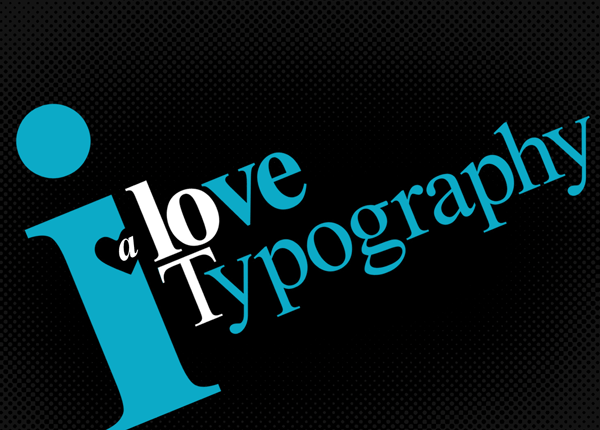
This is a quick experiment that reproduces an image from I Love Typography using nothing more than simple semantic HTML, CSS 2.1, and modern browser implementations of a couple of CSS3 properties. Along the way a few new modern browser bugs and inconsistencies were exposed.

I came across an image on I Love Typography that I thought could be reproduced using just semantic HTML and CSS without resorting to ugly “solutions” that rely on unsemantic and unnecessary elements.

A scaled down and cropped version of the I Love Typography A Lot image from I Love Typography.

The idea was to reproduce the image from realistic markup that may exist “in the wild” and to rely as much as possible on what can be achieved with CSS pseudo-elements.

This is the HTML I ended up using.

<p>I love <strong>typography</strong> <em>a lot</em></p>

This is the CSS that controls the presentation of that content.

body {
   padding:0;
   margin:0;
   font-family:Times New Roman, serif;
   background:#000;
}

p {
   position:relative;
   width:1100px;
   padding:100px 0 0;
   margin:0 auto;
   font-size:175px;
   font-weight:bold;
   line-height:1.2;
   letter-spacing:-13px;
   color:#0caac7;
   -moz-transform:rotate(-20deg);
   -webkit-transform:rotate(-20deg);
   -o-transform:rotate(-20deg);
   transform:rotate(-20deg);
}

/* "i" */
p:first-letter {
   float:left;
   margin:-137px -20px 0 0;
   font-size:880px;
   line-height:595px;
   text-transform:lowercase;
}

/* "love" */
p:first-line {
   font-size:200px;
}

/* "typography" */
p strong {
   display:block;
   margin:-80px 0 0;
   font-weight:normal;
   letter-spacing:-2px;
   text-transform:capitalize;
}

p strong:first-letter {
   margin-right:-30px;
   color:#fff;
}

/* "a lot" */
p em {
   position:absolute;
   z-index:10;
   top:100px;
   left:147px;
   width:136px;
   overflow:hidden;
   padding-left:64px;
   font-size:200px;
   font-style:normal;
   text-transform:lowercase;
   color:#fff;
}

p em:first-letter {
   float:left;
   margin:130px 0 0 -55px;
   font-size:80px;
   font-style:italic;
   line-height:20px;
   color:#fff;
}

/* create the heart shape */
p:before,
p:after {
   content:"";
   position:absolute;
   z-index:1;
   top:225px;
   left:120px;
   width:75px;
   height:50px;
   background:#000;
   -webkit-transform:rotate(45deg);
   -moz-transform:rotate(45deg);
   -o-transform:rotate(45deg);
   transform:rotate(45deg);
   -webkit-border-top-left-radius:25px;
   -webkit-border-bottom-left-radius:30px;
   -moz-border-radius:25px 0 0 30px;
   border-radius:25px 0 0 30px;
}

p:after {
   left:138px;
   -moz-transform:rotate(-45deg);
   -webkit-transform:rotate(-45deg);
   -o-transform:rotate(-45deg);
   transform:rotate(-45deg);
   -webkit-border-radius:0;
   -webkit-border-top-right-radius:25px;
   -webkit-border-bottom-right-radius:30px;
   -moz-border-radius:0 25px 30px 0;
   border-radius:0 25px 30px 0;
}

/* hide the tip of the "t" from "a lot" */
p strong:before {
   content:"";
   position:absolute;
   z-index:11;
   top:205px;
   left:341px;
   width:7px;
   height:7px;
   background:#000;
   -webkit-border-radius:7px;
   -moz-border-radius:7px;
   border-radius:7px;
}

The final CSS typography experiment approximates the original image in all modern browsers that support the CSS3 properties of border-radius and transform.

Some browsers render type (especially after rotational transformations) better than others. Note that all the screenshots are taken from browsers running on Windows Vista OS.
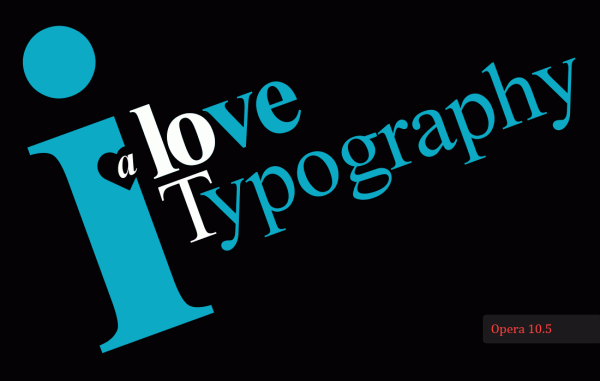
Screenshot of the demo as rendered by Opera 10.5
Opera 10.5. The closest approximation to the original source image.
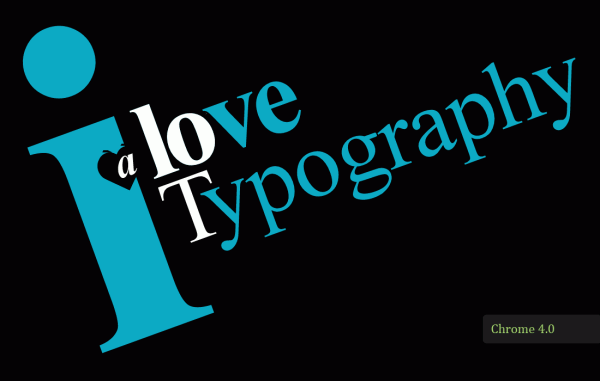
Screenshot of the demo as rendered by Chrome 4.0
Chrome 4.0. Identical to Opera 10.5 apart from a bug that appears in the rendering of rounded corners when they undergo a rotational transformation.
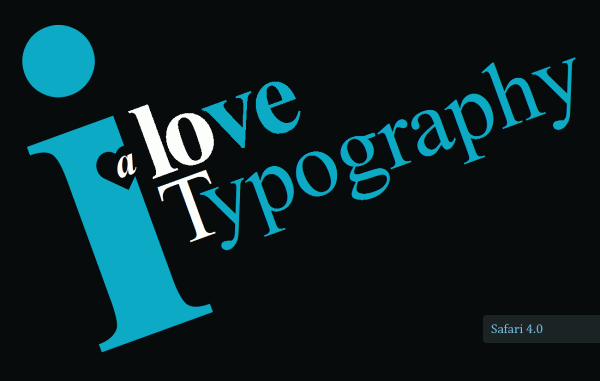
Screenshot of the demo as rendered by Safari 4.0
Safari 4.0. The rotated type suffers from a lack of anti-aliasing.
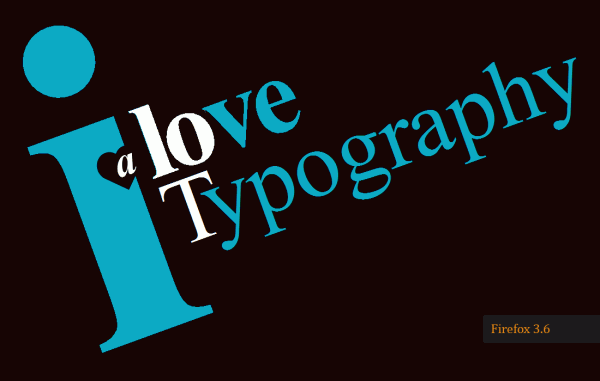
Screenshot of the demo as rendered by Firefox 3.6
Firefox 3.6. The rotated type suffers from a lack of anti-aliasing.

A few bugs and browser inconsistencies

Along the way there were a few bugs and inconsistencies that appeared when using the pseudo elements :first-letter, :first-line, :after and the CSS3 properties border-radius and transform.

I’ve put together a small test page to highlight some new CSS 2.1 and CSS3 bugs in modern browsers. It includes two new CSS 2.1 bugs in Internet Explorer 8.

20 comments

#

Ian Harris says…

Brilliant, this is a great example of what can be achieved using CSS/HTML.

Thanks!!

#

Another Design Blog says…

I’m sad to say that the ugliest version of this experiment is running on Firefox :(

#

Tessa says…

Looks perfect in safari 4 on mac, anti-aliasing works :)

#

Paul says…

Does anyone else think (like I do) that this is phenomenal and is going to change everything!

#

John Faulds says…

@ Tessa: I’m looking at it in a Webkit nightly (not the latest) on Mac and there’s a small white dot near the top right of the white letter ‘o’.

#

Nicolas says…

@Tessa: Thanks for spotting that.

@John Faulds: That dot is a part of the letter “t” from “lot” that is cut off using {overflow:hidden;}. I covered as much of what was left of it as possible using a small block of generated content but all the browsers seem to leave a faint pixel or two right on the edge of the content box.

#

Mirko says…

Very good example of CSS3 possibility!

#

Gonzo the Great says…

Hi Nicolas,

what a cool experiment and I’m astonished this is possible with just HTML and CSS3!

It’s a pity that the outcome on FF is without anti-aliasing. Does the used CSS not work in IE8, because I’ve not seen a screendump of IE8? I’m just asking because 40% of the worldpopulation still uses this sh*tty browser?

Nevertheless, thanks for sharing this experiment, I love it! Cheers & Ciao …

#

Shiva says…

Simply ingenious! Well done

#

Nicolas says…

@Gonzo The Great: That’s right. IE8 doesn’t have CSS3 support (experimental or otherwise) for border-radius and transform:rotate().

But it also has two CSS2.1 bugs that prevent the correct rendering of the experiment (see the bugs demo page that is linked to in the article): it doesn’t correctly position a floated first-letter and it doesn’t properly handle the z-axis positioning of generated content.

Opera 10.1 behaves as IE8 should behave.

#

Adans Soares says…

Parabéns pelo belo Tut. Obrigado!

#

Virtuousquare says…

Really nice composition, and interesting article, thanks.

CSS 3 is really a wonderful tool. By the way, I make illustration with it, have a look. :)

Good continuation.

#

stk says…

We all know IE8(7/6) won’t handle many CSS3 properties. Hopefully, IE9 will.

In the meantime, I’d still recommend tossing up an IE version, b/c IMO, where the others “fail” on detail, IE fails on the big picture – and that’s important to point out to the world.

#

Marcel Korpel says…

Firefox 3.6 under Linux uses the Freetype library to render TrueType fonts. Arch Linux provides default settings, various users have customized them with patches enabling LCD filters in Freetype, cleartype-like support or the patches Ubuntu uses.

I gave several of these a try and the output looks like this:
Default rendering (on my TFT screen, I get blue borders right of the white ‘o’, I guess something goes wrong with subpixel rendering).
Rendering using LCD packages and autohinting (manually) enabled gives a much better look for me.
Rendering using Ubuntu patches and a bit tweaking of fontconfig-settings (for me, this gives the best result).

Bear in mind that these configurations may give a different look on various LCD panels. Also, there are many settings that can be customized, so it’s hard to determine what’s going to give the best look.

#

Marcel Korpel says…

On a second view, there’s hardly any difference noticeable between screenshot 2 and 3. As a matter of fact, general text rendering, especially of smaller fonts, is way better with option 2. But of course that could be due to different settings of fontconfig and the like.

#

Jesse says…

Great post. I started experimenting with the text-rotation as well. With web fonts becoming more common. I think HTML CSS Typography is just going to get more cool.

See my HTML CSS Typography here. http://www.everydayworks.com/?tag=html-typography

Good job!

#

Anon says…

Quite clever. Have you reported the bugs? You should, then they can be fixed.

#

Ella says…

This is great. Thanks for the inspiration!!

#

Heisenberg says…

CSS 3 is really Incredible! thank you for the tut :)

#

Joe says…

This is awesome.
It really shows what can be accomplished these days using only simple HTML and CSS! You really are good at being creative while working within boundaries!

I think I’ll have to link to this when I create some CSS3 tutorials in the near future!

Comments are now closed.