Better float containment in IE using CSS expressions
Research into improving the cross-browser consistency of both the “clearfix” and “overflow:hidden” methods of containing floats. The aim is to work around several bugs in IE6 and IE7.
This article introduces a new hack (with caveats) that can benefit the “clearfix” methods and the new block formatting context (NBFC) methods (e.g. using overflow:hidden) of containing floats. It’s one outcome of a collaboration between Nicolas Gallagher (that’s me) and Jonathan Neal.
If you are not familiar with the history and underlying principles behind methods of containing floats, I recommend that you have a read of Easy clearing (2004), Everything you know about clearfix is wrong (2010), and Clearfix reloaded and overflow:hidden demystified (2010).
Consistent float containment methods
The code is show below and documented in this GitHub gist. Found an improvement or flaw? Please fork the gist or leave a comment.
Micro clearfix hack: Firefox 3.5+, Safari 4+, Chrome, Opera 9+, IE 6+
.cf {
/* for IE 6/7 */
*zoom: expression(this.runtimeStyle.zoom="1", this.appendChild(document.createElement("br")).style.cssText="clear:both;font:0/0 serif");
/* non-JS fallback */
*zoom: 1;
}
.cf:before,
.cf:after {
content: "";
display: table;
}
.cf:after {
clear: both;
}
Overflow hack (NBFC): Firefox 2+, Safari 2+, Chrome, Opera 9+, IE 6+
.nbfc {
overflow: hidden;
/* for IE 6/7 */
*zoom: expression(this.runtimeStyle.zoom="1", this.appendChild(document.createElement("br")).style.cssText="clear:both;font:0/0 serif");
/* non-JS fallback */
*zoom: 1;
}
The GitHub gist also contains another variant of the clearfix method for modern browsers (based on Thierry Koblentz’s work). It provides greater visual consistency (avoiding edge-case bugs) for even older versions of Firefox.
The only difference from existing float-containment methods is the inclusion of a CSS expression that inserts a clearing line-break in IE 6 and IE 7. Jonathan and I found that it helps to resolve some of the visual rendering differences that exist between these browsers and more modern ones. First I’ll explain what some of those differences are and when they occur.
Containing floats in IE 6/7
In IE 6 and IE 7, the most common and robust method of containing floats within an element is to give it “layout” (find out more: On having Layout). Triggering “layout” on an element in IE 6/7 creates a new block formatting context (NBFC). However, certain IE bugs mean that previous float containment methods don’t result in cross-browser consistency. Specifically, this is what to expect in IE 6/7 when creating a NBFC:
- The top- and bottom-margins of non-floated child elements are contained within the ancestor element that has been given “layout”. (Also expected in other browsers when creating a NBFC)
- The bottom-margins of any right-floated descendants are contained within the ancestor. (Also expected in other browsers when creating a NBFC)
- The bottom-margins of any left-floated children are not contained within the ancestor. The margin has no effect on the height of the ancestor and is truncated, having no affect outside of the ancestor either. (IE 6/7 bug)
- In IE 6, if the right edge of the margin-box of a left-floated child is within 2px of the left edge of the content-box of its NBFC ancestor, the float’s bottom margin reappears and is contained within the parent. (IE 6 bug)
- Unwanted white-space can appear at the bottom of a float-container. (IE 6/7 bug)
There is a lack of consistency between IE 6/7 and other browsers, and between IE 6 and IE 7. Thanks to Matthew Lein for his comment that directed me to this IE 6/7 behaviour. It was also recently mentioned by “Suzy” in a comment on Perishable Press.
IE 6/7′s truncation of the bottom-margin of left-floats is not exposed in many of the test-cases used to demonstrate CSS float containment techniques. Using an IE-only CSS expression helps to correct this bug.
The CSS expression
Including the much maligned <br style="clear:both"> at the bottom of the float-container, as well as creating a NBFC, resolved all these inconsistencies in IE 6/7. Doing so prevents those browsers from collapsing (or truncating) top- and bottom-margins of descendant elements.
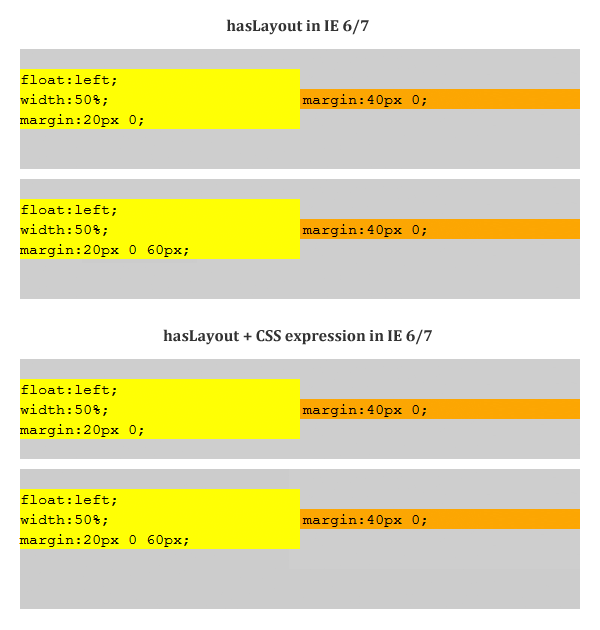
Jonathan suggested inserting the clearing line-break in IE 6/7 only, using CSS expressions applied to fictional CSS properties. The CSS expression is the result of many iterations, tests, and suggestions. It runs only once, the first time an element receives the associated classname.
*zoom: expression(this.runtimeStyle.zoom="1", this.appendChild(document.createElement("br")).style.cssText="clear:both;font:0/0 serif");
It is applied to zoom, which is already being used to help contain floats in IE 6/7, and the use of the runtimeStyle object ensures that the expression is replaced once it has been run. The addition of font:0/0 serif prevents the occasional appearance of white-space at the bottom of a float-container. And the * hack ensures that only IE 6 and IE 7 parse the rule.
It’s worth noting that IE 6 and IE 7 parse almost any string used as CSS property. An earlier iteration used the entirely fictitious properties “-ms-inject” or “-ie-x” property to exploit this IE behaviour.
*-ie-x: expression(this.x||(this.innerHTML+='<br\ style="clear:both;font:0/0">',this.x=1));
However, this expression is evaluated over and over again. Using runtimeStyle instead avoids this. Sergey Chikuyonok also pointed out that using innerHTML destroys existing HTML elements that may event handlers attached to them. By using document.createElement and appendChild you can insert the new element without removing all the events attached to other descendant elements.
Containing floats in more modern browsers
There are two popular methods to contain floats in modern browsers. Creating a new block formatting context (as is done in IE 6/7 when hasLayout is triggered) or using a variant of the “clearfix” hack.
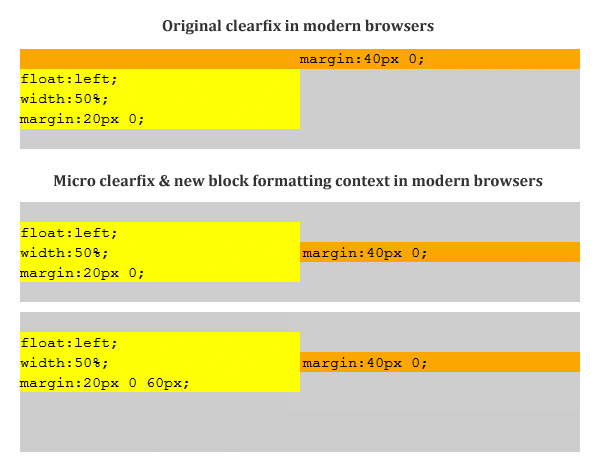
Creating a NBFC results in an element containing any floated children, and will prevent top- and bottom-margin collapse of non-floated children. When combined with the enhanced IE 6/7 containment method, it results in consistent cross-browser float containment.
The other method, known as “clearfix”, traditionally used a single :after pseudo-element to clear floats in a similar fashion to a structural, clearing HTML line-break. However, to prevent the top-margins of non-floats from collapsing into the margins of their float-containing ancestor, you also need to use the :before pseudo-element. This is the approach taken in Thierry Koblentz’s “clearfix reloaded”. In contemporary browsers, the micro clearfix hack is also suitable.
The method presented in this article should help improve the results of cross-browser float containment, whether you predominantly use “clearfix” or the NBFC method. The specific limitations of both the “clearfix” and various NBFC methods (as outlined in Thierry’s articles) remain.
Problems
Using a CSS expression to change the DOM in IE 6/7 creates problems of its own. Obviously, the DOM in IE 6/7 is now different to the DOM in other browsers. This affects any JavaScript DOM manipulation that may depend on :last-child or appending new children.
This is still an experimental work-in-progress that is primarily research-driven rather than seeking to become a practical snippet of production code. Any feedback, further testing, and further experimentation from others would be much appreciated.
Thanks to these people for contributing improvements: Jonathan Neal, Mathias Bynens , Sergey Chikuyonok, and Thierry Koblentz.
19 comments
Thierry Koblentz says…
Hey Nicolas,
That’s a great find. I ran into that bug a few times, but never thought about using a plain old structural hack :)
Not that “plain old” though as I believe using a DIV would lead to very different results.
This being said, I don’t think there is a reason to include this in a clearfix rule as – afaik – this issue does not exist with every construct to which we would apply clearfix. Imho, it should be a *companion* rule that authors would go for whenever they experience that particular issue.
It looks to me as IE acts like if the bottom margin of the child had collapsed. Because once we zero out the margin on the PRE (in your test case) the space is correct. Looks like a clearance bug…
As a side note, I’m not sure about the “*-ms” “prefix”. As you pointed out it could be anything, and as we know expressions are now a ie6/7 only thing. What about being more explicit? Using something like IE67-injection may be. That way authors know exactly what they are dealing with. :)
Please check my text cases for the font syntax when the
brbelongs to the markup. They do show a different behavior. How sure are you that “font” in the expression – with “that syntax” does anything? As I suggested on twitter, the difference could be because it is generated markup, but I’m starting to doubt that…Good job for finding a fix for that bug and thanks for sharing!
Nicolas says…
Hi Thierry, thanks for your comments.
I’m not sure what you mean about zeroing out the margin on the
prebecause even after you’ve done that, there is still the extra white-space in IE 6/7 until you use the expression hack.Initially, I thought IE was collapsing the bottom-margin but it doesn’t appear to be the case. It is not collapsed with the parent’s margin but truncated by the parent.
As for the
*-msprefix, for now I think I’ll revert to usingzoomas the property, and usethis.runtimeStyleto avoid the expression being evaluated over and over again. What do you think?I’m pretty sure using
fontwith that syntax is doing something.fontin some form to remove the extra white-space in IE 6/7font:0doesn’t zero out theline-height.font:0/0zeros out thefont-sizeandline-height.IE’s dev tools show that the font-family has also been to the default. I am still tempted to put
serifin to ensure the syntax is correct.Thierry Koblentz says…
Interesting, it seems we’re not referring to the same behavior. I may try a couple of things this weekend to better understand what’s really going on in IE.
Anyway, I’d not rely too much on jsfiddle when it comes to IE :-(
The “real thing” seems to show that using
font:0orfont:0/0makes no difference:http://tjkdesign.com/test/micro-clearfix.html
Regarding the expression, I think you’re fine with this – afaik, it is only evaluated once (Mathias did a good job).
As a side note, I’d not use “*zoom”, but “zoom” as it is “natively” sandboxed for IE 6/7.
Now THIS IS BIG! I think your fix goes way beyond the mystery IE “gap” bug. I’ve always been against using clearfix because of the way it was styling things across browsers, but you may have found the ultimate solution (if it was not because of the expression itself).
Look at this:
versus this
No more zoom and no more ::before either as the above would style the box the same across browsers, as a structural hack would ;-)
If I was not concerned by the CSS expression (the innerHTML swap), I’d say this is awesome!
Nicolas says…
I ran those tests outside of jsFiddle before transferring them over. Your test-case is different and should “work” without any
fontstyles at all. My test-case shows a problem that arises when using a clearing line-break in an element where the floated content is not as tall as the unfloated content. Often, you cannot be sure whether floated or unfloated content will be the “tallest” and so to avoid the white-space ever appearing I needed to use thefont:0/0declaration.From my tests, the current expression (
expression(this.x||(this.innerHTML+='<br\ style="clear:both;font:0/0">',this.x=1))) is being evaluated over and over. Try changing the firstthis.xtoalert(this.x), but be warned, you’ll probably have to force-quit IE!The reason we went with
*zoomwas to prevent it being applied in IE 8.As for dropping
:before: that was my thought too when working on this. Unfortunately, IE 6/7′s rendering problems mean that just using the clearing line-break doesn’t always result in the same appearance as what is found in modern browsers. It’s also likely that people will be inadvertently or intentionally creating a NBFC in IE 6/7 when they specify widths or try to avoid rendering bugs…and then we’re right back at the beginning without browser consistency for top-margin collapse. And finally, keepingzoom:1in there ensures that even those poor non-JS IE 6/7 users get some pretty good float containment :)Looking forward to what your experiments with this throw up. We wanted to discuss it with you earlier – I was sure your experiments and knowledge of this area would help – but you weren’t about on IRC!
Thierry Koblentz says…
There may be a edge case for the use of
0/0, but as these two pages show, usingfont:0is different than not using font at all:http://tjkdesign.com/test/micro-clearfix/font-and-line-height-on-parent/with-font-0-only.html
http://tjkdesign.com/test/micro-clearfix/font-and-line-height-on-parent/without-font.html
In any case, as discussed, using shorthand without declaring a font-family is against the spec – and IE should ignore it (unless it is in quirks mode if I recall). So we’re in unknown territory here ;-)
Regarding the expression, you’re right. I hadn’t look at the syntax, I just noticed only *ONE* br in the document and concluded you’re using a one shot expression. Yikes! Then yes, I’d go with “runtimeStyle” instead:
I think you can safely drop the “*” as zoom should not trigger anything in IE8 standards mode:
http://haslayout.net/haslayout
http://ajaxian.com/archives/infamous-ie-haslayout-is-toast
It’s really too bad you only want to fix the IE margin bug rather than offering a complete new solution to the problem. Once again, this is the only method I know that clears/encloses floats the same way across browsers. May be you should offer two flavors ;-)
As a side note, that margin bug may be somehow documented here (I didn’t seriously check though):
http://social.msdn.microsoft.com/Forums/en-US/iewebdevelopment/thread/d03ccc6e-bd74-4ce1-af96-b4e496704d85
In case you’re interested, I have different test cases here: http://tjkdesign.com/test/micro-clearfix/
As you will see, explicit margins in IE behave *differently* than implicit margins (from the UA styles sheet). It may be the whole issue here as it seems IE is not aware of the margin it applies on the <pre>. If you use the dev toolbar you’ll see that IE does not report any margin on pre (sic) even if it *shows* at the bottom. If you remove that margin then the bottom margin on the div matches the declaration.
I’m aware of this issue which I mention here: http://www.css-101.org/collapsing-margin/03.php
It could be that the margin *does* collapse at the time there is clearance computation, but for some reason it is painted? Who knows…
Too bad I missed the discussion on IRC (skype was easier for me ;-))
Jatin says…
Great article. I have always struggled with floats on IE, you article came in handy. Thanks a lot.
Nicolas says…
@Thierry: Your test cases use a large
font-sizeandline-height. It confirms my test-cases that show thatfont:0/0is needed to zero out both those properties and avoid the extra white-space appearing.I’ve updated to use
runtimeStylebut applied tozoomrather than overriding a property unrelated to clearing (background-image). Have also kept the star hack in place because otherwise IE 8 does parse the zoom rule. While it has no effect, I also think there is no benefit in exposing it to IE 8.The margin on
preis not related to the IE margin issues though. It is contained within the float and once you remove it, the space at the bottom of the float-container is still wrong (truncated margin). I only later included aprein the example that accompanies this article to make it clear what the styles are (will remove its margin later). All the test-cases that I developed are pre-free!Thierry Koblentz says…
@Nicolas You’re correct, plugging the two expressions below reveals the difference.
expression(this.runtimeStyle.zoom="1",this.innerHTML+='Font\ 0/0');expression(this.runtimeStyle.zoom="1",this.innerHTML+='Font\ 0');It is very interesting though because as I’d suggested on twitter this syntax works only when plugged via the expression. If the same code is in the page, then it does not work unless we add a font-family (which is expected).
As a side note, I don’t think IE8 parses the first zoom rule as it does not support CSS expressions, so it should just ignore that declaration since the only string it would expect in there is “normal”.
It has not concept of “havingLayout” either, but it will parse the second one – as “1″ is a correct value for IE8. But note that this is the default value anyway.
Actually, if I had to remove the star hack from one of the two, I’d to remove it from the second rule. In the first rule, I can understand you want to make the parser “fails” early (on the property instead of the value), but I’d argue that it could be better to “let it go” through the other rule rather than forcing it to trip on the next rule. In short, what’s better? Leaving alone a declaration that sets a default value or throwing a hack at the parser?
Regarding test-cases, I think it is good practice to use
divas you do, rather thanpre,p, etc. as implicit margins do not collapse in IE6 and may show inconsistent results.Thanks for this interesting discussion!
Nicolas says…
Just to mention IE 8: while it does not understand CSS expressions or have “hasLayout”, to expose
zoomto IE 8 results inzoomgoing from implicitnormalto explicit1(equivalent tonormal). Since this hack is there only for IE 6/7 I prefer to hide it from IE 8 entirely. But it’s not particularly important to to do so :)Sergey Chikuyonok says…
Modifying
this.innerHTMLin expressions is very bad practice: if you dynamically create an element with this expression, add some other elements with events bound to them, and push everything back on to the page, you’ll spend sleepless nights figuring out why those events don’t work in IE6/7 :) BecauseinnerHTMLwill rewrite every inner element with a new one.Nicolas says…
@Sergey: Thanks a lot for mentioning the problem with using
innerHTML! I’ve switched the expression back to usingcreateElementandappendChildto avoid destroying elements with events bound.@Thierry: Changing the expression to use
style.cssTextexposes the problem you mentioned with not declaring afont-familyin thefontshort-hand declaration. Now, becauseinnerHTMLis not used, the declaration needs afont-familyto function as intended :)Stephanie (Sullivan) Rewis says…
Great work Nicolas (and Thierry). I love seeing people question what we’ve done so long we quit thinking about it. :)
David Hund says…
Hi Nicolas et al.
The IE expression is interesting and seems to work well but I just ran into a little gotcha re: CSS selectors. It’s a bit of an edge case since I use jQuery to ‘patch’
:last-childsupport in IE 6 etc. Obviously the:last-childselector fails when there’s a<br>*after* the target element :)Nicolas says…
@David Hund: Thanks, we were aware of that. There is also some difficulty with dynamically appending children to a container without having to resort to a CSS expression that is constantly being evaluated.
The technique definitely has its limitations and is more interesting as a bit of research than a particularly practical bit of code. My preference would be to leave IE 6/7 with their little differences (i.e. not use the expression) to avoid running into problems when using JS ‘patches’ or manipulation of the DOM.
I’ll update the post to make the caveats more prominent.
David Hund says…
@Nicolas thanks. While testing a site in IE7 (over vbox) I was getting an annoying “Object doesn’t support this property or method” warning. So I worked through all my JS only to find out the expression caused this! :-/
Might be a strange edge case (_my_ IE7 over vbox) but still: it took a while before I figured out the expression was throwing warnings.
Nicolas says…
@David Hund: I can’t reproduce that error. Have you got a reduce test case? Just to repeat: I wouldn’t use the expression; this is mainly research work.
David Hund says…
@Nicolas It’s research, I understand. I have not looked into it further since I need to meet some deadlines first. Will (maybe) check up on it later and will keep you updated if I know more.
Suzy says…
Hi Nicolas (& Thierry), sorry just caught up with this after trying yet again see if there’s been any more developments – great work on this
I’ve nothing new to add, except prompted by the observation about the 2px thing.. somewhere in the deep distant past I seem to remember that when using clearing elements for IE6 it helped if it had a negative -3px margin (at the time related to the 3px text jog bug.. and one part of it that wasn’t patched in IE7 obviously) I don’t think that will actually help here though as it only worked on a clearing element, will let you know if it does have a bearing
(Yes the same Suzy as commented on Perishable)
Brett Jankord says…
Great work/research, I’m glad to see this method is still being improved. The issues/bugs in using hasLayout in IE6/7 have always been the reason I’ve held off from using this type of method for clearing floats.
Taking a step back and looking this again I came to think, wouldn’t it be nice if there was just one property that would clear floats, similar to overflow:hidden, minus the drawback of cutting off content outside of the parent.
Maybe there is one that I’m not aware of, but I think it would be much easier in the future to add something like, group:clear; to my css and be done. http://jsfiddle.net/bjankord/Lfs2B/
I would love for something like this to make it into CSS 3, until then I’ll continue to look forward to your research into clearing floats.
Comments are now closed.